Guide to reporting fraud – what should you do once you’ve found out?
When your ‘detective work’ reveals that a recording or conversation is a deepfake, your task is to break the chain of lies. This will prevent the scammer from reaching other people, and you’ll be able to sleep more soundly.
Situation 1: Telephone scam (the voice of a loved one)
If you’ve answered the phone and, after a moment’s conversation, realised that the voice of your grandchild or daughter is just a computer-generated fake designed to swindle you out of money:
- End the call immediately: Don’t make excuses and don’t let yourself be drawn into further discussion. Fraudsters are masters at manipulating emotions.
- Do not transfer any money or give out passwords: Criminals often ask for an urgent bank transfer or online banking codes – never do this over the phone.
- Call your family on a number you know: Inform the loved one whose identity someone has tried to impersonate about the whole incident.
- Notify the police: Using the image of loved ones to commit theft is a serious offence. Go to your nearest police station to report the attempted scam.
Situation 2: Online scams (fake videos and photos)
If you come across a video on Facebook or another website that is intended to ridicule someone you know or encourages suspicious investments:
- Do not click on it or share it: Every click and comment makes the scam more popular and reaches more older people.
- Use the ‘Report post’ option: This is the quickest way to remove the false information from the internet.
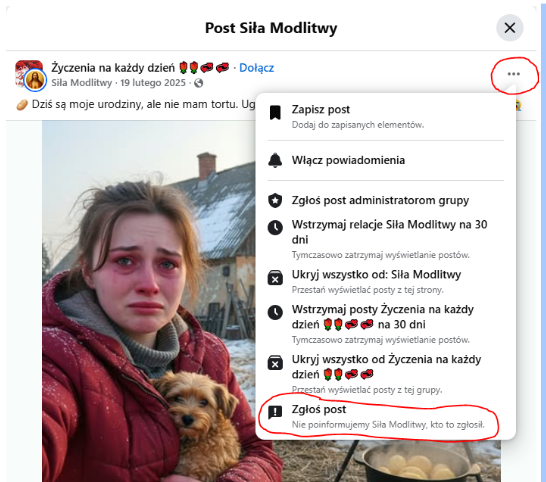
- Look for the three dots next to the post icon (usually in the top right-hand corner).
- Select ‘Report post’ from the list.
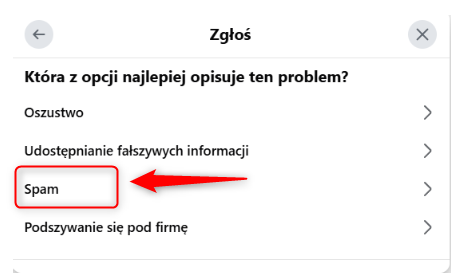
- Then select a reason – in this case, ‘Spam’.
- Finally, you can also indicate that the content was generated by artificial intelligence. This will help recommendation systems detect similar images more effectively in future.